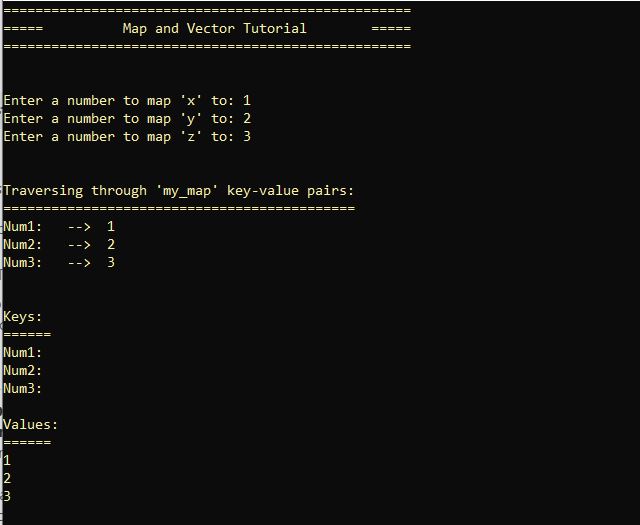
C++ script - Using map and vector to map and store key-value pairs created by user input.
Get link
Facebook
X
Pinterest
Email
Other Apps
IDE: Visual Studio
OUTPUT I
OUTPUT II
SCRIPT
To view the script below clearly, you may right click > open image in new tab> in the new tab, your cursor will turn into a crosshair symbol > left click > will zoom in on script.
Nothing in life is to be feared; it is only to be understood. Now is the time to understand more, so that we fear less. Marie Curie 2025 SANS Cloud Security Exchange was the most incredible learning experience. Those new to the industry simply have to be a part of of attending SANS events such as this. I recently attended SANS 2025 Cloud Security Exchange, where I learned more about designing end-to-end security architectures using Zero Trust principles. The opportunity to learn directly from some of the most influential leaders in this domain was unparalleled; SANS publicised this as being the event of the year to directly interact with the guest speakers, providing an opportunity to learn what may take years, if one expects such nuggets of knowledge to come from experience. The speakers were generous with their time and thoughtful in their responses--making the take aways more than knowledge to apply as best practices, this b...
A Hands-On Guide to System Administration and Infrastructure as Code (IaC). The following C++ project simulates an Infrastructure as Code (IaC) Monitoring and Automation Tool which: collects system details store configurations in JSON-like format simulates deploying infrastructure configurations Output ------------------------------------------------------------------------------------------------------------------------- Step 1 . Set up the project in Visual Studio by creating a new Console App (C++) project. Step 2: Name the project ' DevOpsTool '. Step 3: Ensure the IDE is configured to use the Developer PowerShell terminal. This is helpful because the Developer PowerShell is more powerful than a command prompt. Source: Visual Studio Developer Command Prompt and Developer PowerShell. https://learn.microsoft.com/en-us/visualstudio/ide/reference/command-prompt-powershell?view=vs-2022 Step 4: Add the required libraries. #include <iostream>...
Blue/Green Deployment with AWS Lambda This hands on DevOps project uses two versions of a Lambda function for blue/green deployment . An alias is used to switch traffic between them. An alias is a pointer which directs traffic between two version. This project assumes an AWS account has already been created, and permissions have been granted to access/manage Lambda, IAM, and awscli if one is not root when accessing the AWS console and services. VS Code is the IDE being used with a virtual environment and PowerShell for the terminal. Step 1: Set up the virtual enironment. The most important commands in working with your virtual environment are: Create your virtual environment py -m venv env Activate your virtual environment env\Scripts\activate TODO: It's also a good idea to update pip using the following command: py -m pip install --upgrade pip Go to View > select Command Palette > Select Python Interpreter > (env:venv) Configure credenti...
Comments
Post a Comment